7 Free AI Image to Video Generators for Small Businesses 2026
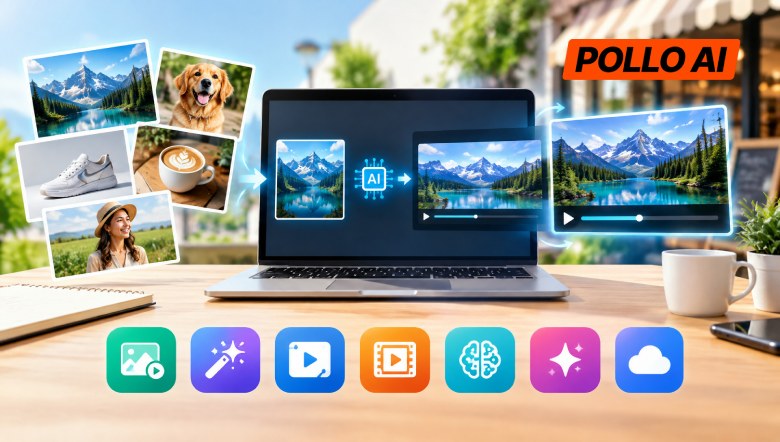
Small businesses can turn existing product photos into short videos for ads, product pages, and social media without arranging a new shoot. But free AI image to video generators differ in motion control, generation limits, and commercial-use rights. This guide compares seven tools and explains which workflows they suit best.
7 Free AI Image to Video Generators at a Glance
Tool |
Best for |
Free access |
Main limitation |
Pollo AI |
Flexible product video creation |
Limited free credits |
Costs vary by model and settings |
Runway |
Testing creative concepts |
125 one-time credits |
Limited model access and watermarks |
Canva |
Branded social content |
Monthly AI allowance |
Five-second clips without audio |
Pika |
Creative transformations |
No monthly credits on the Free plan |
No commercial license on the Free plan |
Luma Dream Machine |
Cinematic product visuals |
No fixed recurring free allowance listed |
Free and Lite generations are for personal use |
Hailuo AI |
Lifestyle scenes |
Limited free credits |
Resolution and watermark restrictions |
PixVerse |
Short-form video experiments |
Daily free credits |
Unused credits expire daily |
Free-plan details and licensing conditions can change. Check the official terms before using generated videos in commercial campaigns.
The 7 Best Free AI Image to Video Generators
1. Pollo AI
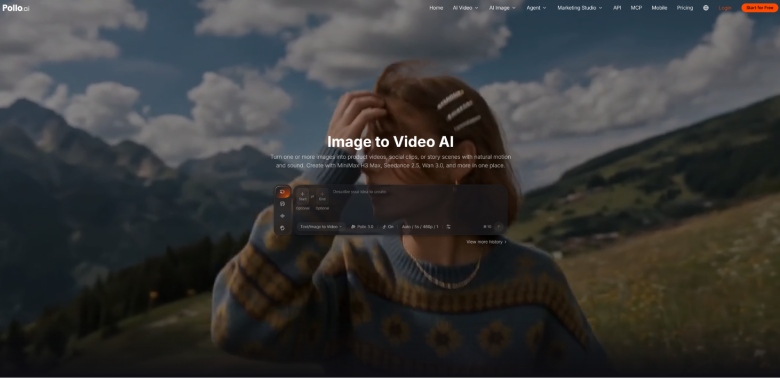
Pollo AI Image to Video is an AI tool that turns one or more uploaded images into video clips. Users can describe the movement they want in a text prompt, including the subject’s actions, camera movement, pacing, and overall mood. The tool provides access to multiple video generation models, so users can choose different approaches for animating product photos, portraits, illustrations, and other still images. Depending on the selected model and settings, generated clips can also include audio, such as sound effects or voiceover. Pollo AI offers credit-based free access, allowing users to try image-to-video generation before deciding whether to pay for more usage.
What Makes Pollo AI Stand Out?
For small businesses, the main advantage is the ability to turn existing visual assets into video concepts without arranging a new shoot. An online store could animate a product photo for a product page, while a café could add subtle movement to a seasonal drink image for an Instagram Reel. Users can also experiment with different models, motion directions, and aspect ratios to explore variations for social media, ads, and landing pages. Multiple reference images can help guide the appearance of a subject or scene, although generated results should still be checked for changes to packaging, logos, and product details. This makes the tool useful for testing creative ideas with existing assets, particularly when time and production budgets are limited.
Best for: Small businesses that want to turn existing product photos and marketing visuals into short videos for ecommerce, ads, and social media.
2. Runway
Runway is an AI creative platform with tools for generating and editing video from images and other inputs. Its image-to-video capabilities can add subject movement and camera motion to a static visual, with the available controls depending on the selected model. The Free plan includes 125 one-time credits and 5 GB of asset storage. Credits do not renew after being spent, model access is limited, and free-plan videos carry a watermark.
What Makes Runway Stand Out?
Runway is particularly useful when a team needs to evaluate a visual idea before spending money on a campaign. A furniture retailer could test whether a slow camera move makes an interior photograph feel more inviting, while a fashion brand could explore movement in an editorial-style image. These tests help marketers assess composition and mood before investing in production. The main trade-off is the limited credit balance: several rounds of generation can use it up quickly, especially when a prompt needs refinement. It is therefore more suitable for concept development than routine, high-volume output.
Best for: Businesses that want to validate a few creative directions before committing to a larger production budget.
3. Canva
Canva is an online design platform with an Image to Video feature that animates still images and lets users continue editing in the same workspace. After generating a clip, users can add text, logos, brand colors, and other design elements to prepare a social post or promotional asset. Free users can access the feature while their monthly AI allowance remains available. Generated clips are five seconds long and have no audio, so music or sound effects must be added separately when needed.
What Makes Canva Stand Out?
Canva is a practical choice when the final deliverable is a complete social post rather than a standalone video file. A café could animate a photo of a seasonal drink, add the price and launch date, and prepare the post without moving between multiple editing tools. A small retailer could use the same workflow for a sale announcement or new-product teaser. This reduces the time spent assembling campaign assets, particularly for teams without a dedicated designer. However, the short clip duration and limited AI allowance make it less suitable for complex scenes or repeated video production at scale.
Best for: Small businesses that need short, branded promotional content with minimal editing.
4. Pika
Pika is an AI video generation platform with image-to-video and creative transformation tools. It is suited to visual experiments that go beyond straightforward camera movement, allowing businesses to explore stylized motion and unusual effects. Its current Free plan lists zero monthly credits, so users generally need to purchase credit packs to generate content unless other promotional access is available. The Free plan does not include a commercial license, making its usage terms an important consideration for business projects.
What Makes Pika Stand Out?
Pika can be useful when a campaign needs a more playful or unexpected visual. A gift shop could experiment with a product reveal that changes the scene, while a small accessories brand might test a stylized transformation for a short social clip. This approach works best when the goal is to catch attention rather than demonstrate a product with complete accuracy. Businesses should inspect the generated footage for warped shapes, inconsistent textures, or altered logos. The lack of monthly free credits also means Pika is better evaluated as a creative option with a potential generation cost than as a source of ongoing free production.
Best for: Brands exploring distinctive visual effects for short-form campaigns.
5. Luma Dream Machine
Luma Dream Machine is an AI video generation tool that supports image-to-video creation and cinematic motion. It can animate a still image with camera movement and changes in scene dynamics, making it useful for developing more polished visual concepts from existing photography. Luma's current pricing information does not list a fixed recurring free video-generation allowance. Its licensing guidance states that generations under Free and Lite plans are for personal use and carry watermarks, while commercial use requires an eligible plan.
What Makes Luma Dream Machine Stand Out?
Luma is worth considering when a business wants to explore a cinematic presentation rather than a simple animated photograph. A furniture retailer could test a slow camera move across an interior, while a cosmetics brand could explore a close-up reveal with changing light and reflections. These concepts can help a team decide whether a more elaborate product shoot is worthwhile. However, generated motion may alter packaging text, proportions, or reflections, which can be a problem for product listings and paid ads. Businesses should treat early generations as visual tests and confirm licensing before using them commercially.
Best for: Businesses exploring cinematic product concepts before committing to a commercial plan.
6. Hailuo AI
Hailuo AI is an AI video generation platform designed to produce moving scenes from prompts and reference images. Its image-to-video workflow can animate lifestyle photographs and product visuals, with the selected model influencing motion quality and output options. Published pricing information lists a limited free credit allowance, with restrictions on resolution and watermarks. Available models, generation limits, and commercial-use rights depend on the current plan, so businesses should check the official terms before using free outputs in marketing campaigns.
What Makes Hailuo AI Stand Out?
Hailuo AI is useful when a business wants movement that feels connected to a real scene rather than a simple zoom effect. An outdoor brand could test a lifestyle photograph with subtle environmental motion, while a home goods retailer could animate a product shown in a room setting. This can make existing campaign imagery feel less static without requiring new footage. More complicated interactions still need careful review: hands, moving objects, and product details may shift between frames. The free plan's output restrictions also mean businesses should assess whether the available resolution is sufficient for the intended platform.
Best for: Small businesses testing lifestyle scenes and natural-looking motion from reference images.
7. PixVerse
PixVerse is an AI video generation platform that supports image-to-video creation and other visual effects. It can turn still images into short clips for product teasers, promotional posts, and creative experiments. Its official FAQ lists 60 daily free credits for members and 30 for non-members. Credits refresh at 00:00 UTC and expire at the end of the day, while the number of videos available depends on the selected model and generation settings.
What Makes PixVerse Stand Out?
PixVerse suits teams that prefer to test creative ideas in small batches over time. An online shop could try a slow camera movement for one product image and a more energetic reveal for another, then compare which version better fits the brand. Daily credits provide recurring opportunities to experiment without relying on a one-time balance, although they do not guarantee a fixed number of videos. Businesses should check generation costs before starting a batch and review each result for product consistency, visual artifacts, and suitable framing for the target platform.
Best for: Small teams that want recurring opportunities to test short promotional video concepts.
How to Choose a Free AI Image to Video Generator for Your Small Business
-
Match your marketing needs: Product ads need consistent product details, while social posts may benefit from quick animation and branded layouts. For small businesses handling multiple ecommerce marketing tasks, Pollo AI is a versatile choice, offering tools for creating videos, images, and audio in one place.
-
Compare free access and costs: Check credit limits, generation costs, and expiry rules to find a tool that fits your budget and content schedule.
-
Check commercial-use rights: Review watermark restrictions and licensing terms before using generated content in ads or other business materials.
-
Test real outputs: Use the same product image and prompt across a few tools to compare motion quality, product consistency, and editing effort. Pollo AI is worth trying for its range of creative tools, while Canva suits branded social posts, Runway supports concept testing, and Pika, Luma Dream Machine, Hailuo AI, and PixVerse offer other approaches to video generation.
Final Thoughts
Free AI image-to-video generators give small businesses a practical way to turn existing photos into marketing content without the cost of a new shoot. The right choice depends on the task: Canva works well for branded social posts, Runway for testing creative concepts, and Pika, Luma Dream Machine, Hailuo AI, and PixVerse offer different ways to explore video effects and motion.
For small businesses that need more than video creation, Pollo AI is a versatile option to consider. Designed with ecommerce and marketing workflows in mind, it brings together tools for creating videos, images, and audio, helping small teams produce a wider range of campaign assets without juggling multiple platforms. Try turning an existing product photo into a short video on Pollo AI, explore its other creative tools, and see which features fit your workflow before deciding whether to upgrade.
7 Free AI Image to Video Generators for Small Businesses 2026

10 Best Healthcare UX Design Agencies: Leading Companies in 2027



7 Best Free and Open-Source Quoting Software for Businesses


Recognition Software Features That Matter Most to Employees
Why AI Glasses Are Attracting Attention From Tech Companies