
Your Email Address: The First Signal A Client Reads Before Your Proposal
A prospect who receives a business proposal rarely reads it in full the first time. They look at the sender, the subject line, the signature, and then decide whether to keep going. In those few seconds of triage, the sending address carries far more weight than the attention it usually gets.
For a development agency, a digital marketing firm or an IT provider, this detail is anything but cosmetic. It shapes both perceived credibility and, more concretely, the odds that the message reaches the inbox at all.
What your domain says about your business
An address built on the company's own domain implicitly signals several things: that the business owns its domain, that it controls its accounts, and that an employee leaving will not take the client's email history with them.
A mailbox hosted with a consumer provider, by contrast, raises questions the prospect will never ask out loud. Who actually owns this inbox? What happens to the correspondence if that person leaves? On a five-figure project, those doubts carry weight.
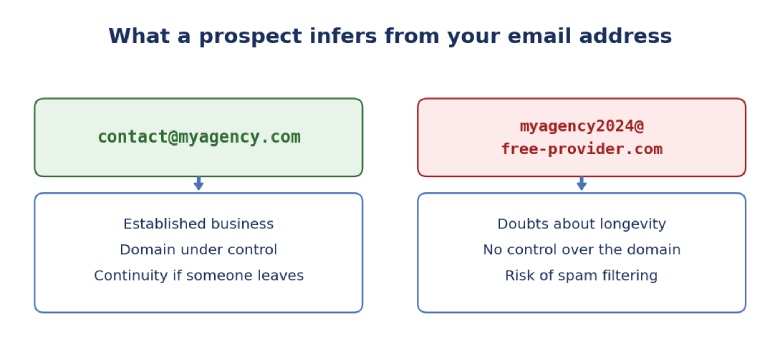
Two addresses, two immediate readings by the prospect.
The technical problem nobody anticipates
Beyond perception, there is a purely technical constraint. Corporate mail servers filter incoming messages based on the sender domain's authentication. Three mechanisms come into play: SPF, which declares which servers may send on behalf of the domain; DKIM, which cryptographically signs messages; and DMARC, which tells receiving servers what to do when the first two fail.
An agency prospecting from a free address controls none of these three settings. Its messages therefore land in spam more often, without anyone being notified. The prospect did not decline the proposal: they never saw it.
This is a particularly frustrating way to lose contracts, because it is invisible. Response rates are low, the message or the targeting takes the blame, and the actual problem sits further upstream.
What to look at when choosing
-
A custom domain: the baseline requirement. Without it, none of the authentication settings are possible.
-
Alias management: the ability to create contact, quotes or billing addresses without paying for extra licences.
-
Account recovery: an administrator must be able to retrieve a mailbox when someone leaves, without depending on their goodwill.
-
Encryption: an agency handles client access, staging credentials and sometimes contractual documents.
-
Hosting jurisdiction: it determines which authorities can request access to the data, regardless of where the servers physically sit.
That last point deserves attention for providers working with European clients subject to the General Data Protection Regulation. A business email that is end-to-end encrypted and hosted outside jurisdictions with extraterritorial reach meets that requirement without adding complexity for the team.
The real cost of a free address
The usual argument for a consumer mailbox is price. It rarely survives scrutiny. An agency that loses a single contract per quarter to a filtered message or a doubt about its credibility has already spent far more than the annual cost of professional email for the whole team.
There is a second, less direct cost: the time spent managing the consequences. Forwarding messages, chasing silent prospects, piecing together a history scattered across several personal inboxes. Guidance from bodies such as the UK National Cyber Security Centre makes the same point: basic tooling determines a small business's capacity to handle larger accounts.
Setting it up is faster than people think
Migration often puts people off before they start. In practice, for a team of fewer than twenty people, the job fits into a weekend: buying or transferring the domain, creating the mailboxes, configuring the DNS records, importing the history, then running both systems in parallel for a few days.
The part not to overlook is updating every place the old address appears: email signatures, directory listings, social profiles, the legal notice on the website, invoice templates. A professional address that coexists with the old one for months cancels out part of the benefit.
The particular case of directories and marketplaces
Agencies listed on professional directories receive a meaningful share of their inbound enquiries through that channel. These platforms pass on contact details exactly as they were entered. A generic address inspires noticeably less confidence in a decision-maker comparing five providers on the same page, and that credibility gap opens before anyone looks at the portfolio.
It is worth periodically checking that the address on those listings, the one used for outreach and the one shown on the website all match. Discrepancies are common and give an impression of disorganisation that does not always reflect the reality of the business.
For a business that sells technical expertise, the sending address is the first piece of evidence. It is also the cheapest one to fix.

How to Build Links Without Losing Sight of Quality








Why HR Teams Should Connect Workforce Planning With Talent Development